New staff keep asking; answers vary
SOPs and product knowledge are split across chats, paper, and experienced staff. Handoffs break when the shop gets busy.
An AI operations workspace for small service businesses
Dianqora brings shop knowledge, operations documents, revenue reports, and meeting tasks into one workspace, plus an AI monthly shop report and health check every month. Staff can find the source, managers can see gaps, and people keep final approval.
Shop knowledge base
Passage sources · Knowledge gaps
Operations document templates
Human approval · Draft only
Revenue report analysis
CSV import · Statistical rules
Meeting records
Owner · Due date
Product walkthrough
A 1:29 walkthrough in Chinese of the current version, using sample shop data (not real results). Nothing in the workspace calls an AI model. The video is hosted on this site and downloads only when you press play.
Watch the walkthrough in a new windowThese jobs happen every day, but scattered information and last-minute work make the team repeat them.
SOPs and product knowledge are split across chats, paper, and experienced staff. Handoffs break when the shop gets busy.
The same message gets rewritten several times, and every change needs another round of confirmation.
Daily data exists, but no one has time to compare periods and items. Anomaly days may go unnoticed until month-end.
Notes and messages scatter the decisions. Owners and due dates stay unclear, so the next meeting starts over.
Four modules
Each module handles a real task while keeping data, drafts, and action items in one operating context.
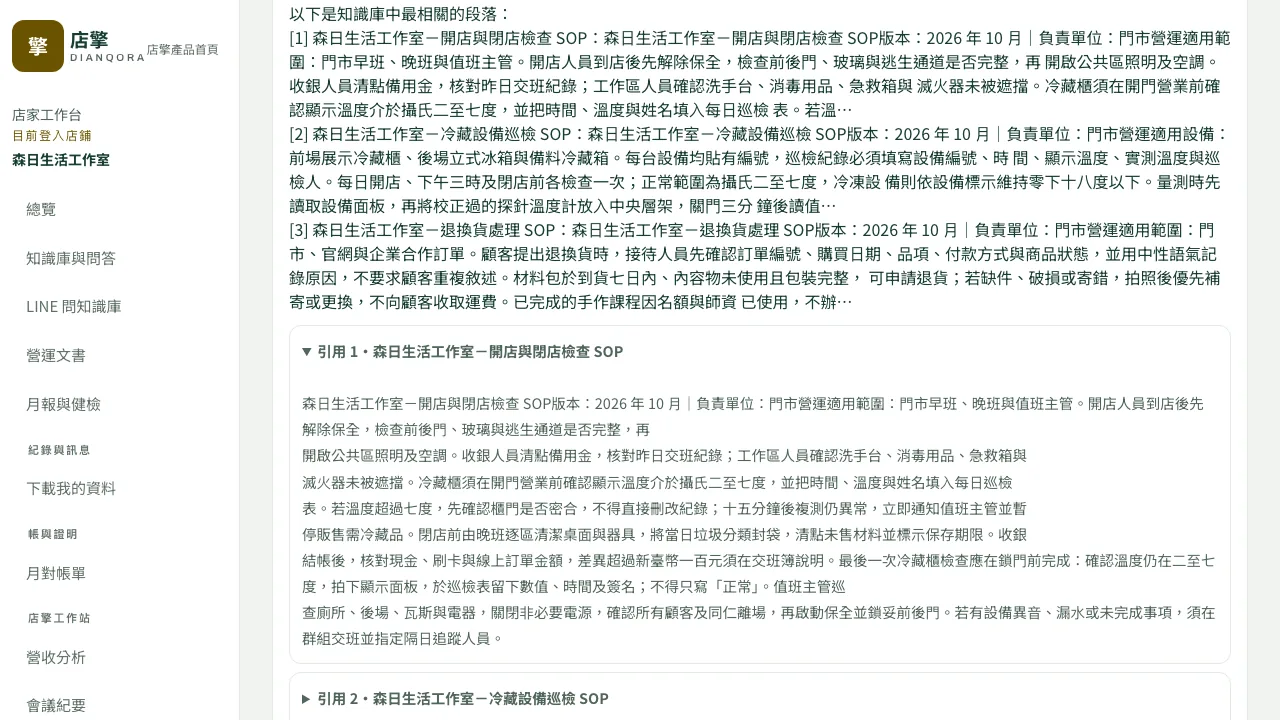
Passages with their source; no match goes to the gap list
Staff enter a question or keyword. The system matches it against document passages and shows the most relevant ones with their source, without AI rewriting. Questions with no matching passage enter a knowledge-gap list so managers know which document is missing. Staff bound to the shop’s LINE official account can also send a question or keyword in LINE and receive the most relevant passages with their source.
Paste text or upload txt, md, and pdf files: up to 30,000 characters per document, 100 documents, and 200,000 characters in total, with full-text search and tags. For automatic replies to customers on LINE, use the LINE official account’s built-in keyword auto-response, set up by the shop.
Passages with source · Full-text search · Knowledge gaps · LINE lookup
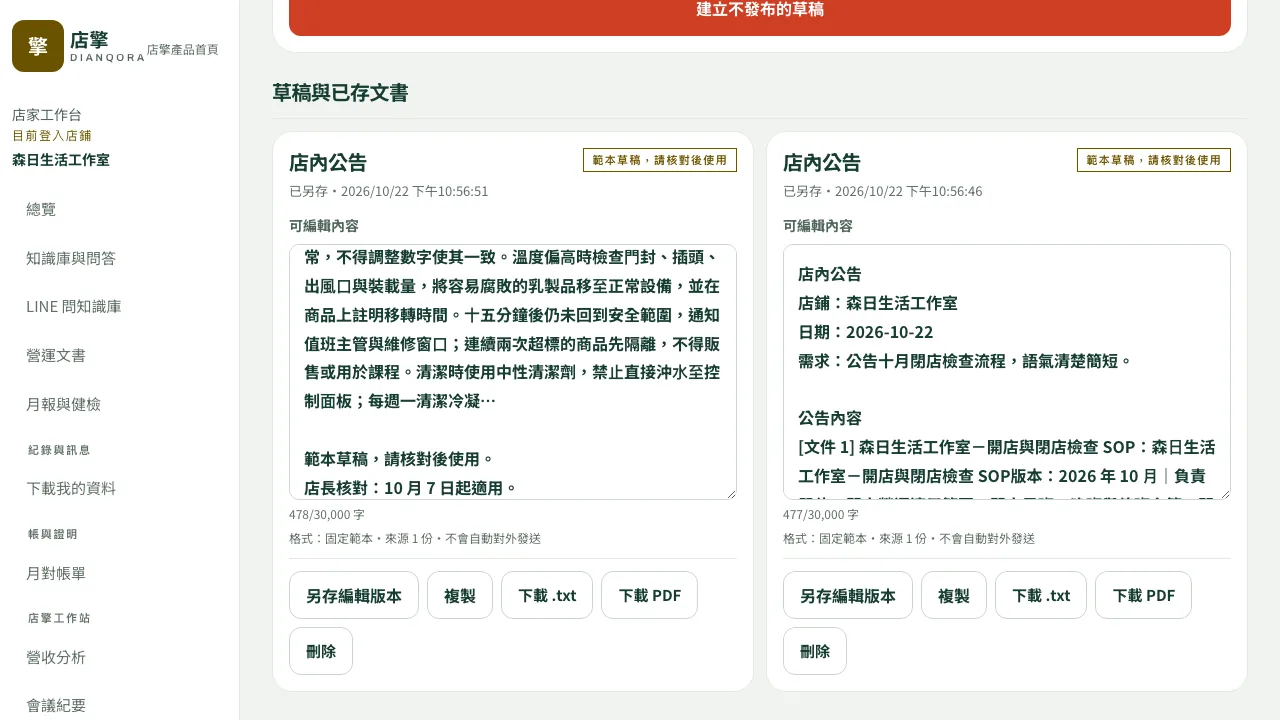
A draft first; people approve before use
Templates for shop announcements, shift and shift-change notices, training quizzes (true/false with answers), and SOP drafts, filled with the shop name, date, your brief, and excerpts from 1–5 selected documents. Every result remains an editable draft and is never sent or published automatically.
Managers can edit the content and check the excerpt sources before using it in the shop.
Announcements · Shift changes · Training quizzes · SOP drafts
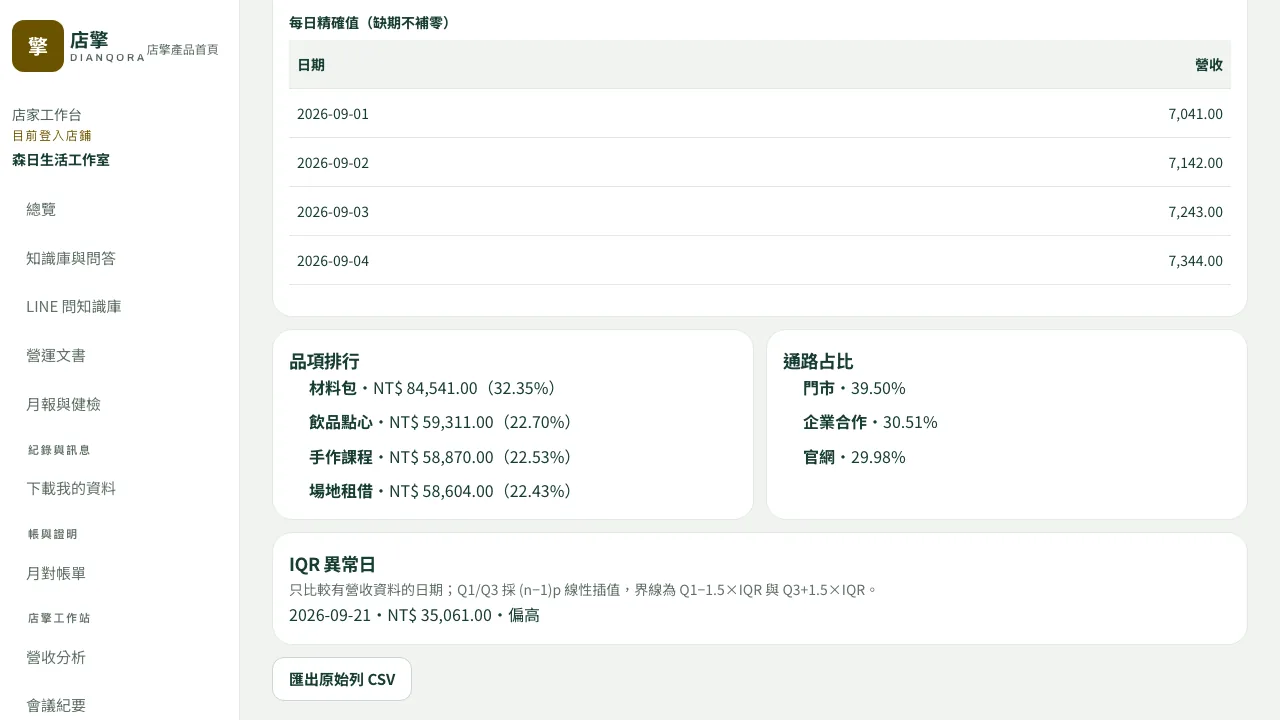
Calculated by the server with explicit rules; no AI
Import a CSV from any POS (up to 50,000 rows per file). The server calculates daily, weekly, and monthly trends, item rankings, channel share, period comparisons, and anomaly days, and the data can be downloaded.
Anomaly days follow a statistical rule. Revenue interpretation is part of the AI monthly shop report; the workspace produces no AI summary.
Plan 2 and up · Trends · Rankings · Anomaly days · Data download
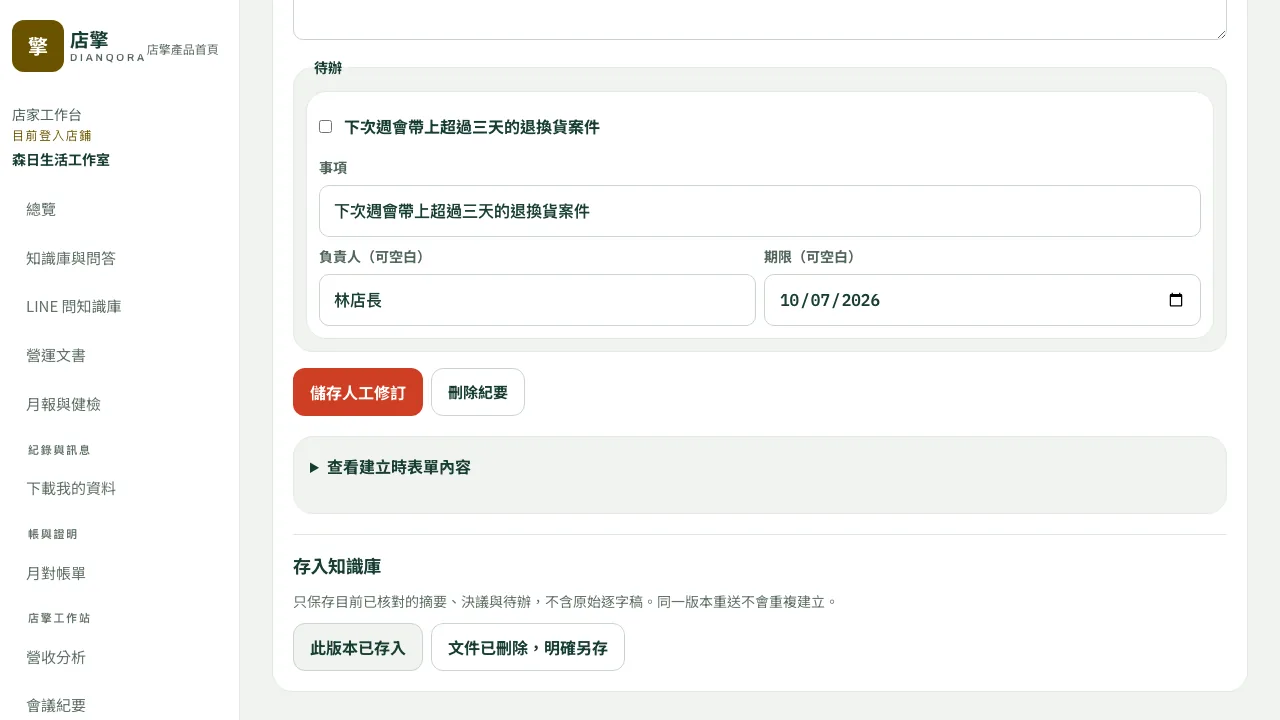
Turn discussion into decisions and tracked actions
Use a form to record the summary, decisions, action items, owners, and due dates. Confirmed records can be saved back to the knowledge base for later search and handoff.
Action items can be checked off one by one and tracked across meetings, so decisions do not disappear after the meeting.
Plan 2 and up · Summary · Decisions · Actions · Save to knowledge base
No flattering placeholder metrics. These fields come from actual shop usage and remain available for review and export.
The AI monthly shop report and health check are uploaded to your back office. The health check lists knowledge gaps, outdated documents, overdue action items, revenue anomaly days, and account and permission issues.
See questions staff asked that have no matching passage in current documents.
Review the owner, due date, and completion state of meeting decisions.
Export shop data and usage records to keep a complete copy.
From opening checks to closing handoff, each step connects to the next.
Staff search service steps and product knowledge, then verify the passage source.
Managers apply a template to create editable drafts and approve them before use.
The back office calculates the POS CSV before the team reviews comparisons and anomaly days.
Record the summary, decisions, action items, owners, and due dates.
Resolve unanswered questions and save confirmed meeting records to the knowledge base.
Customer evidence
We are recruiting the first cohort of shops. Published cases will be based on real shop contracts and usage records; demo data will not be used.
Lookup and calculation in the workspace follow explicit rules and call no AI. AI is used only for the monthly report and health check, checked by people, and the shop keeps the final decision.
Knowledge-base lookup shows the most relevant passages with their source, without AI rewriting. No matching passage means a knowledge gap.
Revenue trends, rankings, period comparisons, and anomaly days are calculated by the server with statistical rules; no AI is involved.
The AI monthly shop report and health check are included in all three plans, delivered monthly and never charged per use.
Shops can export their data and usage records in bulk. Row-level rules isolate one shop from another.
Servers and databases are hosted in Taiwan. The monthly report and health check use aggregated numbers only, with no customer personal data or raw transactions, and are checked by people before upload.
Each workspace includes five manager + staff accounts; the owner is excluded from the seat count.
Three plans
Start with knowledge and documents, activate all four modules, or hand ongoing knowledge-base organization to our team.
01
NT$100,000
tax included / 12 months
Connect your shop knowledge and documents first
Recommended starting point
02
NT$200,000
tax included / 12 months
All four modules, including revenue and meetings
03
Scope-based quote
Scope and price agreed item by item
Run the shop while we organize the knowledge base
| Feature and service | Plan 1 · Shop Essentials | Plan 2 · All Modules | Plan 3 · Managed Operations |
|---|---|---|---|
| Price | NT$100,000 including tax / 12 months | NT$200,000 including tax / 12 months | Scope-based quote (scope and price agreed item by item) |
| In one line | Connect your shop knowledge and documents first | All four modules, including revenue and meetings (recommended starting point) | Run the shop while we organize the knowledge base |
| Shop knowledge base (full-text search and tags, passage lookup with sources, knowledge-gap list, LINE knowledge-base lookup) | ✓ | ✓ | ✓ |
| Knowledge-base documents and management (100 documents, 30,000 characters each, 200,000 Chinese characters total) | ✓ Self-managed | ✓ Self-managed | ✓ Organized by our team |
| Operations document templates (shop announcements, shift and shift-change notices, training quizzes, SOP drafts; used only after human review) | ✓ | ✓ | ✓ |
| Revenue report analysis (POS CSV import, daily/weekly/monthly trends, item rankings, channel share, period comparisons, anomaly days, data download) | — | ✓ | ✓ |
| Meeting records (summary, decisions, action items checked off and tracked across meetings; can be saved to the knowledge base) | — | ✓ | ✓ |
| AI monthly shop report and AI shop health check (from aggregated numbers, checked by people, then uploaded; no AI usage fee) | ✓ | ✓ | ✓ |
| Manager + staff accounts (owner excluded) | 5 | 5 | Agreed by location count |
| Bulk data and usage-log export; free download within 90 days after expiry | ✓ | ✓ | ✓ |
| Onboarding and training | Online onboarding + 1 training session | Implementation + 2 training sessions (knowledge base and back-office operation) | By scope |
| Managed knowledge-base organization (SOP digitization and regular updates) | Self-managed | Self-managed | ✓ |
| Dedicated contact | — | — | ✓ |
| Multiple locations | — | — | ✓ By scope |
| Commission or transaction fees | None | None | None |
| Item | Quantity | Unit |
|---|---|---|
| 01Shop knowledge-base documents and management (txt, md, pdf, or pasted text) | 100 | documents (30,000 characters each, 200,000 Chinese characters total) |
| 02Full-text search and tags | 1 | set |
| 03Passage lookup with sources (no AI rewriting) | 1 | set |
| 04Knowledge-gap list | 1 | set |
| 05LINE knowledge-base lookup (staff bound to the shop’s LINE official account) | 1 | set |
| 06Operations document templates: shop announcements, shift and shift-change notices, training quizzes (true/false with answers), SOP drafts | 4 | templates (each draft includes excerpts from 1–5 documents) |
| 07POS revenue CSV import and charts | 50,000 | rows/file |
| 08Daily, weekly, and monthly trends, item rankings, channel share, period comparisons, anomaly days, and data download | 1 | set |
| 09Meeting records: summary, decisions, action items checked off one by one and tracked across meetings | 1 | set |
| 10AI monthly shop report (checked by people, then uploaded) | 1 | report/month |
| 11AI shop health check (checked by people, then uploaded) | 1 | report/month |
| 12Manager + staff seats and role permissions | 5 | per workspace (owner excluded) |
| 13Bulk data download and usage-log export | 1 | set |
Each workspace includes 5 manager + staff seats; the owner does not count. The "unanswered questions" list collects staff questions with no matching passage in the knowledge base, so the manager knows which documents to add. Revenue CSVs can come from any POS export. The AI monthly shop report and health check use aggregated numbers only, with no AI usage fee.
These response and data-handling timelines are stated in the approved customer contract.
The platform availability target is calculated over each monthly service period.
P1: 2 hours, accepted 24/7 year-round. P2: 1 business day. P3: 2 business days. P2 and P3 are handled on weekdays, 10:00–18:00; all support requests go by email (info@sainso-tech.com).
At least 48 hours' notice; no more than 4 hours of scheduled maintenance per month.
Backups at least once every 24 hours; RPO ≤ 24 hours and RTO ≤ 4 hours.
Data remains available for free download for 90 days after expiry or termination, then is deleted within the following 180 days.
Gather your shop SOPs, product or service documents, and revenue CSV exports from your POS. Your shop confirms the content and users; we help with activation, setup, and training. Use a browser without replacing your existing POS.
Paste text or upload txt, md, or pdf files. Each document supports up to 30,000 characters; each workspace supports 100 documents and 200,000 characters in total. Convert scanned PDFs to extractable text first.
Both are included in all three plans, with no AI usage fee. Each month, Sainso Technology uses its existing AI tools to prepare an AI monthly shop report and an AI shop health check from your shop’s aggregated numbers only (no customer personal data, no raw transactions). People check both before they are uploaded to your back office as txt or PDF. The health check lists knowledge gaps and outdated documents, overdue action items, revenue anomaly days, and account and permission issues. The workspace itself calls no AI model and has no monthly AI usage limit.
Each workspace includes 5 manager + staff seats; the owner does not count. Seats count distinct users, so multiple roles or reissued invitations for one person count once. Accepted members, including suspended accounts, and unexpired invitations reserve seats; expired invitations do not. Users with access to several workspaces count in each workspace.
Shop data is hosted in Taiwan, isolated by row-level rules, and accessed according to role permissions. The workspace calls no AI model; the monthly report and health check use aggregated numbers only, with no customer personal data or raw transactions. Shops can export their own data and usage records in bulk.
It does not make one up. The system only matches your question against document passages and shows the most relevant ones with their source; AI does not rewrite or generate answers. Questions with no matching passage enter the knowledge-gap list so the manager can add a document. Verify the source against your shop context.
Plan 1 includes the shop knowledge base, document management, and operations document templates. Plan 2 adds revenue report analysis and meeting records. Plan 3 also includes managed knowledge-base organization, a dedicated contact, and multi-location support. All three plans include the AI monthly shop report and AI shop health check, and none charges additional commission or transaction fees. Prepare an inquiry below or call us directly.
Plan 1 is NT$100,000 including tax for 12 months. Plan 2 is NT$200,000 including tax for 12 months. Plan 3 has its scope and price agreed item by item. Sainso Technology Co., Ltd. issues a formal quotation after scope confirmation and before contract signing; none charges additional commission or transaction fees.
Fixed plans run for 12 months. There is no automatic renewal requirement; continuation follows the agreement between both parties.
Yes. The 1:29 walkthrough above shows the current version with sample shop data. You can also book an onboarding consultation.
In the workspace, revenue totals, rankings, period comparisons, and anomaly days are calculated by the server with statistical rules; no AI is involved. AI is used only for the monthly shop report and health check, written from aggregated numbers without raw transactions, and checked by people before upload.
Tell us your shop type, team size, and the work that takes the most time. We will explain an onboarding approach based on the real workflow.
Contact
Share your shop type, team size, and the work that takes the most time. We will suggest a practical onboarding approach.