Put daily shop operationsinto a workspace that keeps your shop knowledge in order.
Dianqora brings a shop knowledge base, operations document templates, revenue report analysis, and meeting records into one browser workspace for beauty and hair salons, restaurants, and retail stores, plus an AI monthly shop report and health check every month.
Shop knowledge base
Staff find the passage and see where it came from
Operations document templates
Start from a template, get an editable draft
Revenue report analysis
Works with CSV exports from any POS
Meeting records
Record discussions as checkable work
See the four modules in action
A 1:29 walkthrough in Chinese of the current version, using sample shop data (not real results). Nothing in the workspace calls an AI model. The video is hosted on this site and downloads only when you press play.
Watch the walkthrough in a new windowBuilt for beauty, food service, retail, and other small service shops
Architecture
Browser-based for staff, isolated data and permissions for every shop
Staff connect to app.dianqora.com in a browser. The application and shop data are hosted in Taiwan and isolated by row-level tenant rules. The workspace calls no AI model; the monthly shop report and health check use aggregated numbers only.
Staff and manager browsers
app.dianqora.com
Shop database (Taiwan)
AI monthly shop report and health check
Knowledge-base lookup, document templates, revenue reports, and meeting records in the workspace call no AI model. AI is used only for the AI monthly shop report and AI shop health check that Sainso Technology prepares for each shop every month: aggregated numbers only, no customer personal data or raw transactions, checked by people, then uploaded to the shop back office as txt or PDF.
Four modules for handoffs, documents, revenue, and meetings
Work starts from each shop’s own documents and imported data. Lookup, templates, and reports follow explicit rules, the workspace calls no AI model, and people remain responsible for review.
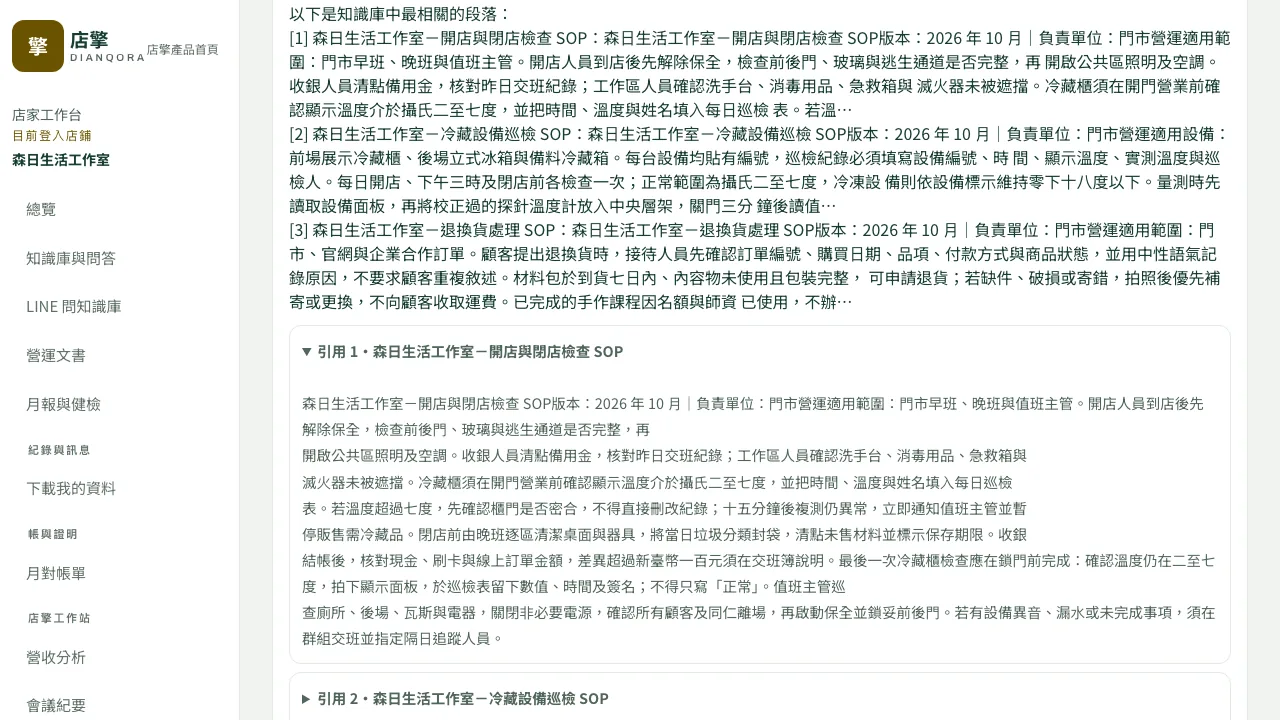
Sample data · Open the image at full size
Paste content or upload txt, md, and pdf files, with full-text search and tags. When staff enter a question, the system matches it against document passages and shows the most relevant ones with their source, without AI rewriting. Questions with no matching passage enter a knowledge-gap list so the manager can add a document. Staff bound to the shop’s LINE official account can also send a question or keyword in LINE.
Designed for the shop floor, without another management burden
Knowledge transfers
Keep SOPs and product knowledge together. Lookup results show the original source, and gaps stay visible.
People approve drafts
Announcements, shift notices, and training quizzes start from templates and stay editable drafts. Nothing is published automatically.
Reports read clearly
Turn POS CSV files into trends, rankings, comparisons, and anomaly days, calculated by the server with explicit rules.
Your data stays portable
Each shop is isolated, with complete data and usage records available for export at any time.
Data & AI safety
Shop data comes first; AI sees aggregates only
Data is hosted in Taiwan. Shops are separated by row-level tenant rules. The workspace calls no AI model; the monthly shop report and health check use aggregated numbers only, with no customer personal data or raw transactions, and are checked by people before upload.
Shop isolation
One shop cannot read another shop’s data
No personal data
The AI service uses aggregates only, never customer personal data
Human check
Monthly reports and health checks are checked before upload
Full export
Shops can download their data at any time
Start with the knowledge already in your shop
Your team owns the content and review. We help with setup and operation.
Gather existing data
- Your shop
- Prepare SOPs, product documents, and POS revenue CSVs. Remove unnecessary personal data.
- Our support
- Explain supported formats and import columns, and clarify your needs.
Activate and invite
- Your shop
- Confirm the owner, manager, and staff list, with roles based on their work.
- Our support
- Guide workspace setup and account invitations.
Complete a first round
- Your shop
- Look up real shop questions in the knowledge base, import a report, and record one meeting.
- Our support
- Walk through the knowledge base, document templates, reports, and meeting records, and explain the monthly report and health check.
Review and hand over
- Your shop
- Verify sources and numbers, fill knowledge gaps, and review drafts before handoff.
- Our support
- Explain document maintenance, usage records, and data exports.
Questions before you get started
What should we prepare for onboarding?
Gather your shop SOPs, product or service documents, and revenue CSV exports from your POS. Your shop confirms the content and users; we help with activation, setup, and training. Use a browser without replacing your existing POS.
Which documents and limits are supported?
Paste text or upload txt, md, or pdf files. Each document supports up to 30,000 characters; each workspace supports 100 documents and 200,000 characters in total. Convert scanned PDFs to extractable text first.
What are the AI monthly shop report and AI shop health check? Do they cost extra?
Both are included in all three plans, with no AI usage fee. Each month, Sainso Technology uses its existing AI tools to prepare an AI monthly shop report and an AI shop health check from your shop’s aggregated numbers only (no customer personal data, no raw transactions). People check both before they are uploaded to your back office as txt or PDF. The health check lists knowledge gaps and outdated documents, overdue action items, revenue anomaly days, and account and permission issues. The workspace itself calls no AI model and has no monthly AI usage limit.
Who counts toward the 5 seats?
Each workspace includes 5 manager + staff seats; the owner does not count. Seats count distinct users, so multiple roles or reissued invitations for one person count once. Accepted members (including suspended accounts) and unexpired invitations reserve seats; expired invitations do not. Managers or staff with access to several workspaces count in each workspace.
Is shop data isolated, and can we export it?
Shop data is hosted in Taiwan, isolated by row-level rules, and accessed according to role permissions. The workspace calls no AI model; the monthly report and health check use aggregated numbers only, with no customer personal data or raw transactions. Shops can export their own data and usage records in bulk.
What happens if the knowledge base has no answer?
It does not make one up. The system only matches your question against document passages and shows the most relevant ones with their source; AI does not rewrite or generate answers. Questions with no matching passage enter the knowledge-gap list so the manager can add a document. Verify the source against your shop context.
What is included, and how do we contact you?
Dianqora offers three plans: Shop Essentials at NT$100,000 including tax for 12 months, All Modules at NT$200,000 including tax for 12 months, and Managed Operations with scope and price agreed item by item. None charges additional commission or transaction fees. Prepare an inquiry below or call us directly; this website only prepares an email draft.
Contact
Tell us about your shop workflow
Share your shop type, team size, and the work that takes the most time. We will suggest a practical onboarding approach.
See how four modules fit daily shop operations
The demo uses fictional salon data for knowledge-base lookup, document templates, revenue comparisons, and meeting tasks.